GifWidget Pro
- 4.1
- Rating
- 10.00K
- Installs
- $2.49
- Price
 Analysis by App-foxy
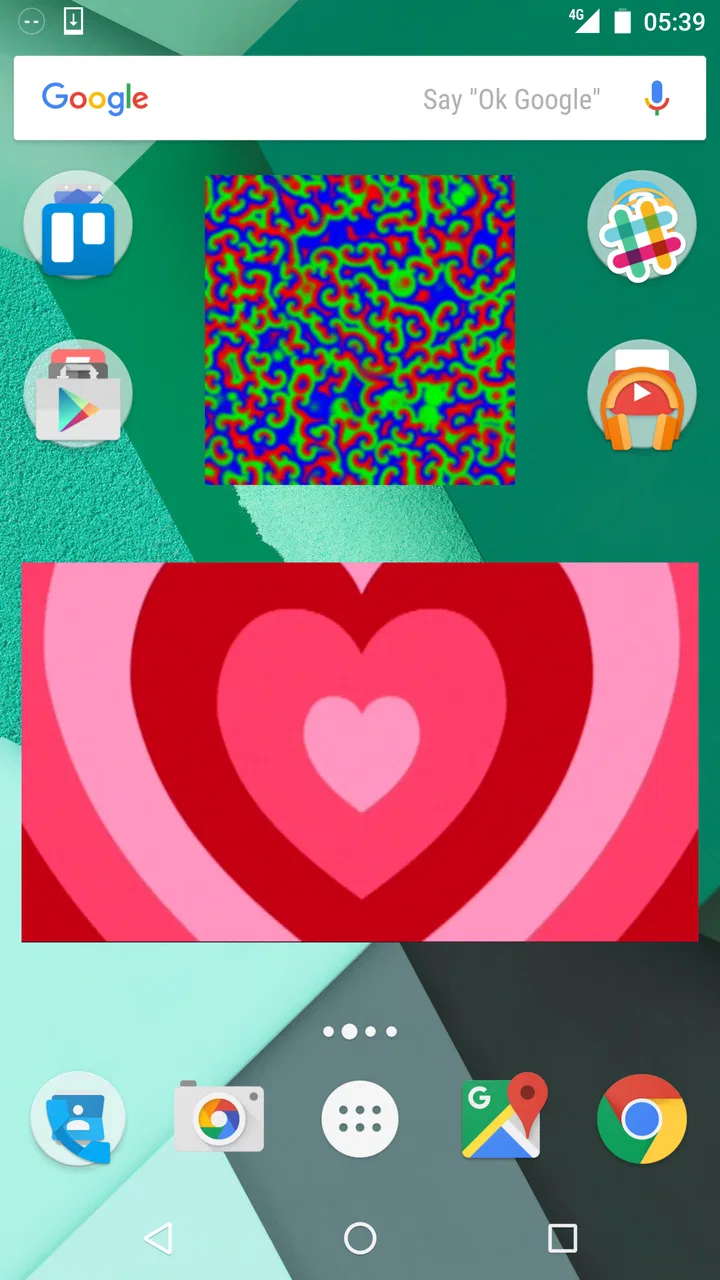
I like home-screen widgets that do one small thing well, and GifWidget Pro takes that idea in a very literal direction: it puts an animated GIF where I normally see app icons and shortcuts. Developed by Momo apps, this Personalization app is aimed at people who want their Android home screen to feel more expressive without replacing the entire launcher or applying a complicated theme.
My first impression is that it is a niche tool rather than an all-purpose customization suite. You are not getting a complete icon pack, a live wallpaper collection, or a social GIF browser. You are getting a focused way to keep a chosen GIF visible on the home screen. That narrow purpose is also its appeal. If you already have a favorite reaction, pet clip, character animation, or tiny visual reminder, the widget can make it part of your daily phone layout instead of hiding it in a messaging app.
The app costs $2.49, carries an Everyone age rating, and has reached over 10 thousand installs. Its average rating is 4.1 from around 500 ratings, with close to 90 written reviews. Those figures suggest a small but genuinely interested audience, which matches my experience of the product: it is easy to understand, but its value depends heavily on whether an animated image on your home screen is something you actually want.
You May Also Like

 AccuWeather: Weather Radar
AccuWeather Review: A Quick, Clear Forecast for Everyday Decisions
For everyday plans, the best forecast is the one you can understand quickly. AccuWeather makes rain timing, radar, and local conditions easy to act on, with a few trade-offs.

 Hill Climb Racing
Why Hill Climb Racing Still Turns Crashes Into One More Run
A tiny car, a bumpy hill and one more upgrade: Hill Climb Racing keeps resurfacing because its simple chaos makes every near-miss feel personal.

 AliExpress - Shopping App
AliExpress Makes Global Shopping Feel Personal, but Shoppers Bear the Risk
AliExpress turns a global marketplace into a pocket-sized discovery engine. Its reach is useful, its shopping loop compelling, and its trade-offs easy to miss.

 Lords Mobile: Kingdom Wars
Lords Mobile Is a Kingdom-Building Routine, Not a Quick Match
A case-by-case verdict on the building, battles, device demands, and social commitments that make Lords Mobile rewarding for some players and exhausting for others.

 PDF Scanner app - TapScanner
TapScanner Makes Paperwork Easier to Capture, Check, and Share
TapScanner makes scanning with a phone feel less like a rescue operation and more like a dependable step in getting work done. Its capture tools are useful, though not flawless.

 Block Blast!
 Shows How Much a Puzzle Game Can Leave Out
A quiet grid game shows why puzzle players increasingly value instant clarity, repeatable skill and low-pressure play—and where the genre still needs to catch up.
More From Our News Desk
View All News


How GifWidget Pro fits into everyday phone use
I find a GIF widget most useful when a phone is shared casually at home: a favorite pet animation or family in-joke can make the screen feel welcoming without changing the launcher for everyone. This section looks at that everyday role and the small placement choices that help a personal flourish coexist with practical shortcuts. It also sets up the question of who should handle the widget when the device is used by more than one person.
A small widget with a very specific job
The central idea is simple. Instead of opening a gallery or a chat whenever you want to see a GIF, you place that animation directly on a home-screen panel. The result is more personal than a static wallpaper, but less disruptive than changing the entire appearance of the phone. I found that distinction important because it lets the widget coexist with the launcher layout I already use.
A practical example is a workday home screen with one panel reserved for useful shortcuts and another kept visually lighter. I could place the GIF widget in an open area on the second panel, where it acts almost like a small mood marker. A looping animation of a favorite animal can make the phone feel less sterile, while a visual cue connected to a hobby can make the device feel more familiar. It is not productivity software, but it can add personality without forcing a full redesign.
The widget also works for people who communicate through visual reactions. Someone who regularly sends a particular celebratory or humorous GIF might prefer seeing it immediately after unlocking the phone. That does not make the animation more useful in a traditional sense, but it does make the home screen feel connected to the way that person uses messaging apps.
The important trade-off is space versus expression. Every widget occupies room that could otherwise hold icons, folders, or another tool. A GIF that looks charming at first may become visual noise if it is too large, too bright, or constantly moving beside your most-used apps. I recommend starting with the smallest practical placement and keeping it on a secondary home-screen page until you know whether the motion remains pleasant after several days.
What setup feels like in practice
Using a widget-based app requires a little more patience than installing an ordinary app. The application itself is not the whole experience; the Android launcher is involved too. I would install it, return to the home screen, enter the launcher’s widget picker, and look for GifWidget Pro there. From that point, the useful work is choosing an image and placing it where it can be seen without interfering with taps.
This is one reason I would not recommend it to someone who wants a completely automatic result. The process is straightforward for anyone familiar with Android widgets, but a person who rarely changes the home screen may wonder why the app does not simply appear as a normal icon. The distinction between opening an app and adding a widget is small for experienced Android users and surprisingly confusing for everyone else.
Placement deserves more attention than I expected. A GIF can look fine in a preview and still feel cramped once it shares a row with icons. I had better results when I treated it like a decorative tile rather than trying to squeeze it into an awkward gap. Leaving some visual breathing room around the animation makes the home screen look intentional, while placing it between unrelated shortcuts can make the layout feel accidental.
Another useful habit is to test the widget on both a light and dark section of the wallpaper. Animated images with transparent or pale backgrounds can lose contrast depending on what sits behind them. Since the widget becomes part of the launcher rather than a full-screen viewing experience, the surrounding wallpaper and icons affect how polished it appears.
Why the paid version makes sense for a narrow audience
GifWidget Pro is priced as a small paid personalization purchase rather than a subscription-based service. That matters for this kind of tool. If I know I want a dedicated GIF widget and expect to keep it on my phone, paying once feels easier to justify than adding another recurring charge for a decorative feature.
Still, the price only makes sense when the use case is clear. If you are merely curious about animated home-screen images, you may lose interest quickly. A normal gallery, launcher shortcut, or wallpaper can already give you a visual change without requiring a dedicated widget. The paid model is therefore most attractive to someone who specifically wants the GIF to remain visible in a compact home-screen element.
I also see value for people who dislike advertising clutter in customization tools. A focused paid app can feel calmer than a large free customization package filled with unrelated themes and prompts. That does not automatically make it better for everyone, but it does give the product a clear identity: buy it for this one behavior, not for a long list of extras.
What its history tells me about the current experience
The app’s long history gives me a reason to judge it as a focused utility, not as a promise of an expanding customization platform. In a shared household, that distinction matters: one person can choose and arrange a widget, while others may prefer a quieter screen or a different layout. I’ll consider how to set expectations around those boundaries, then turn to what the app’s age does—and does not—tell us about the experience today.
A long-running idea rather than a trend-driven redesign
The app was released on May 20, 2013, which gives it a much longer history than most current personalization experiments. That age changes how I judge it. I do not expect the same visual language or feature breadth as a recently redesigned launcher companion. Instead, I look at whether the original idea still feels useful on a modern Android home screen.
Its continued presence suggests that the basic concept has a durable appeal, even though the audience is specialized. The product does not need to compete with every wallpaper and theme app if it reliably handles its one distinctive task. In my view, the older release date also explains why the experience feels more utilitarian than fashionable. It is closer to a clever widget utility than a polished customization ecosystem.
The developer, Momo apps, appears here as the name behind a compact product rather than a broad platform. That is relevant when setting expectations. I would approach this as a self-contained tool, not as the center of a large content library or a constantly expanding design system. The best reason to install it is the widget itself.
How to interpret the product’s evolution without overpromising
The confirmed release history establishes that the concept has been available since 2013, but it does not by itself prove a particular sequence of redesigns or feature additions. I would therefore separate what is visible now from what I might hope to see next. The current evidence supports judging GifWidget Pro as an established, focused widget app. It does not justify assuming that a major modernization or a new feature set is imminent.
For existing users, that distinction is useful. If the widget already fits your layout and continues to display the GIF you chose, the app can remain valuable even without dramatic changes. A small utility does not need frequent visual reinvention to earn a place on the phone. On the other hand, people who expect regular interface refreshes, broad customization controls, or a large stream of new content should be cautious about buying it for future potential.
I would also avoid confusing longevity with universal compatibility. An app can have been around for years and still require a little launcher-specific experimentation. Android home screens vary by manufacturer and launcher, so the placement experience may not feel identical on every phone. That is less a criticism of the concept than a reminder that widgets live inside another system.
What changes mean for someone already using it
For an existing user, the main question is not whether the app is exciting but whether it remains dependable in the routine of unlocking the phone. If your GIF is still visible, positioned correctly, and not disrupting your icons, the product is doing its job. The strongest benefit is continuity: a small personal element stays in the same place and becomes part of muscle memory.
There is also a practical maintenance angle. Home-screen layouts can change when people switch launchers, reorganize pages, or adjust wallpaper. I would take a moment to recheck the widget after any major home-screen change instead of assuming that a previous placement will remain ideal. This is especially important if you use a dense layout, because a decorative widget can become inconvenient when surrounding icons are moved.
My advice for current users is to treat the GIF as a visual accent, not as a replacement for a shortcut. Keep your essential apps in predictable locations and let the animation occupy leftover space. That workflow protects the useful part of the home screen while preserving the playful reason for installing the widget.
Where the app still falls short
A moving image can be charming on one person’s phone and distracting on a device several people rely on, so I weigh comfort and predictability alongside personalization. This section takes a closer look at the practical limits, including why a GIF widget may not suit every home-screen habit or every age group. From there, I’ll give a household-focused verdict that weighs the app’s narrow appeal against simpler alternatives.
It is not a complete personalization system
The biggest limitation is scope. GifWidget Pro does not replace the functions of a launcher, icon pack, wallpaper manager, or lock-screen customization tool. If your goal is a coordinated visual theme, this app will only handle one small piece of the result. You would need to make the rest of the design choices yourself.
That can be refreshing, but it can also feel bare if you expected a catalog of customization options. Someone looking for animated wallpapers, automatic theme switching, icon editing, or a broad collection of ready-made designs should choose a more comprehensive alternative. The usual wallpaper app is better when you want the entire background to change. A launcher is better when you want control over grids, gestures, folders, and icons. GifWidget Pro is better only when the widget itself is the point.
The animation can also become distracting. A constantly moving image is different from a static photograph because the eye notices motion even when you are trying to focus on another task. I would avoid placing it next to a calendar, task list, or work-related shortcut if you find movement pulls your attention away. A calmer GIF, a smaller widget, or a less prominent page can make the idea much easier to live with.
Questions about battery, data, and daily comfort
Any animated home-screen element naturally raises questions about battery use and responsiveness. I would not judge the app solely by the existence of motion, because the real effect depends on the GIF, the launcher, the phone, and how often the home screen is active. The sensible approach is to watch your own device during normal use rather than assuming that every animation will have the same impact.
Large or visually complex GIFs are also less comfortable than small, simple ones. A short loop with clear shapes is more suitable for a home screen than a busy animation with constant flashes. This is a non-obvious but useful selection rule: choose the image as if it were part of an interface, not as if you were watching it in a chat window for a few seconds.
Privacy-minded users may also prefer the simplicity of selecting a local image they already have instead of relying on a separate online feed. I would keep the workflow local and deliberate when possible: choose a file from the phone, test it in the widget, and remove it if it no longer feels useful. That keeps the app’s role limited to personalization rather than turning it into another content destination.
Who should use it, and who should skip it
I would recommend it to Android users who enjoy small visual details, already have a GIF they love, and are comfortable adjusting a home-screen layout. It is especially suitable for a personal phone where expression matters more than a strictly minimal arrangement. It can also work for someone who wants a gentle reminder connected to a hobby, pet, fandom, or recurring mood without opening an app every time.
I would skip it if you prefer a motion-free home screen, need every available grid space for shortcuts, or want one app to manage an entire theme. It is also not the best choice for someone who rarely uses widgets and does not want to spend time arranging one. In those cases, a static wallpaper or a normal image shortcut will probably provide the desired personality with less friction.
My recommendation after living with the concept
GifWidget Pro succeeds because it does not pretend that a tiny widget must become a complete customization platform. Its identity is clear: bring one animated image into the place you see every time you unlock your phone. That can be surprisingly enjoyable when the chosen GIF has personal meaning, but it is not a feature everyone needs.
The strongest way to use it is selective. Pick one animation that remains pleasant after repeated viewing, give it enough room, and place it away from the shortcuts you use for serious tasks. Think about contrast, motion, and the amount of empty space on the page. Those small decisions make more difference than simply adding the widget and accepting its first position.
My final view is positive but specific. I would pay $2.49 for this app if I had a clear GIF-based home-screen idea and wanted a focused, one-time personalization purchase. I would not recommend it as a general solution for redesigning Android. Its 4.1 average from around 500 ratings reflects a product that appeals strongly to the right people while remaining too narrow for others.
The most sensible expectation is steady usefulness rather than a dramatic evolution. The app’s release in 2013 shows that the underlying idea has staying power, while its focused design makes its limitations easy to understand. If you want a home screen with one moving personal detail, Momo apps’ GifWidget Pro is worth considering. If you want a full visual makeover, start with a launcher or wallpaper tool instead and leave this widget for the one job it handles best.
FAQs for GifWidget Pro
01What is GifWidget Pro and what does it do?
GifWidget Pro is an Android customization app designed to place animated GIFs directly on your home screen as widgets. After selecting a GIF from your device, you can add it to a compatible widget size and watch it animate without opening a separate app. It is mainly intended for personalization, entertainment, and displaying favorite reactions, characters, or short animations.
02How do I add a GIF to my home screen with GifWidget Pro?
After installing GifWidget Pro, open the Android widget picker by pressing and holding an empty area of your home screen, then locate GifWidget Pro and drag the preferred widget size onto the screen. The app should then let you choose a GIF from your gallery or available files. Depending on your launcher and Android version, the exact steps and widget appearance may vary slightly.
03Does GifWidget Pro support every GIF file and Android device?
GifWidget Pro is designed for Android devices that support home-screen widgets, but compatibility can depend on the Android version, launcher, screen size, and the GIF itself. Very large, unusually encoded, or extremely long GIFs may use more memory or fail to display correctly. Before downloading, check the app’s current Google Play listing for supported Android versions and any stated limitations.
04Does GifWidget Pro affect battery life or phone performance?
Animated widgets can consume more battery and system resources than ordinary static widgets, particularly when several GIFs are displayed or when the animations are large and highly detailed. On newer phones, the impact may be modest, but older or budget devices could experience more noticeable battery usage or occasional home-screen slowdowns. Using shorter, smaller GIFs and fewer widgets can help reduce the effect.
05Is GifWidget Pro free, and are there any privacy concerns?
The price and included features may depend on the version available in your region, so review the current store listing before installing. The app may require access to photos, media, or files so you can select GIFs for your widgets; those permissions are relevant to its main function. As with any app, read the developer’s privacy policy and avoid granting unrelated permissions that are not necessary.
Pros
- Adds animated GIFs directly to your home screen.
- Offers quick access without opening a separate app.
- Useful for personalizing widgets with favorite animations.
- Pro version may provide extra customization options.
- Simple concept that is easy to use after initial setup.
Cons
- Animated widgets can consume more battery than static widgets.
- GIF quality may vary depending on the source file.
- Some devices may limit widget animation in the background.
- Initial setup can require several permissions and configuration steps.
- Compatibility and performance may differ across Android versions.

GifWidget Pro
Gallery